Carbon accounting that fits a working team
For a sustainability manager, the challenge is often collecting consistent information from colleagues, offices and suppliers. Sustrax provides a shared place for that work: enter or upload activity data, check calculations, retain evidence and explore the resulting footprint.
Finance teams can bring in purchasing data, site teams can contribute energy records, and reviewers can examine results. Role-based access helps each person work with the information relevant to their responsibilities.
From a utility bill to an emissions record
Emission factors are maintained for you: UK Government conversion factors from Defra, with country-specific electricity factors from CaDI, Carbon Footprint Ltd’s proprietary emissions database. Your team works with activity data, not factor lookups.
- Collect: choose an input category and enter the activity data, or download its Excel template for bulk upload.
- Check: review records before saving. AI Fill (Beta) can help extract information from source documents; your team checks and corrects the proposed entries.
- Explain: add notes, files and tags to retain context for your review.
- Explore: analyse results by year, month, site or GHG category and export the data you need.
Software that supports your reporting process
Sustrax organises emissions by GHG Protocol scope and category. Its analysis controls include location-based and market-based electricity reporting, site and date filters, and reporting views for SECR, PPN 006, SBTi and the Net Zero Standard.
For example, the SECR filter selects relevant categories and adds UK/global energy breakdowns; filtered data can then be exported. These tools support the calculation and data-preparation work. They do not replace checking your organisation’s reporting obligations, boundary, disclosures or verification needs.
Discuss the categories and reporting outputs you need when choosing a package. Carbon Footprint Ltd’s verification and assurance services offer a separate route to expert review.
Track progress, not just a year-end total
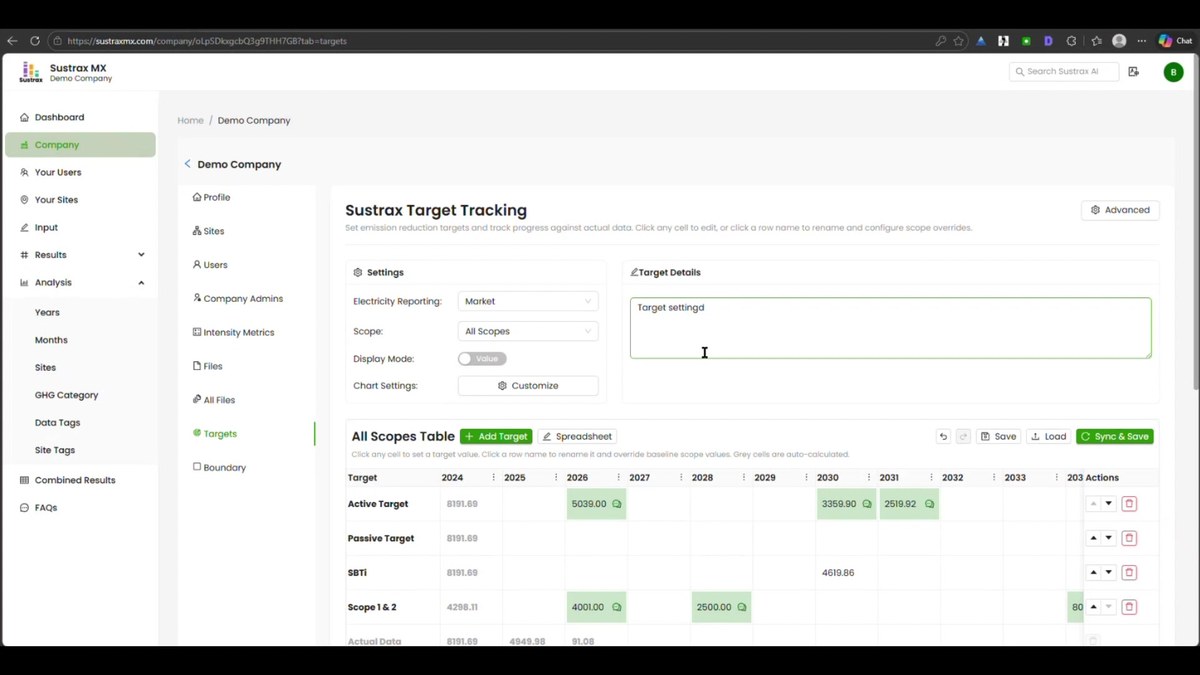
Compare an active reduction target with a business-as-usual pathway, review actual emissions against the baseline, and record assumptions beside your targets. Monthly tracking in MX helps you spot changes during the year. Intensity metrics can put emissions in context alongside measures such as employee numbers or turnover.
Choose the right starting point
MX suits organisations that need monthly tracking, multiple contributors and a broader range of inputs. AX offers annual tracking with expert review. For a smaller first footprint, explore the Lite range before comparing all plans and limits.
Connect measurement with wider climate action
Sustrax is part of Carbon Footprint Ltd’s wider offering, alongside carbon footprinting expertise, reduction planning and the carbon credit marketplace. Use your footprint to prioritise reductions, then explore public project information when considering support for climate projects.